
Search the text in your screenshots.
A receipt, a booking, that place you saved. Type a word you remember. ShotFinder finds the screenshot, right on your phone.
 Free. No account needed. Works offline.
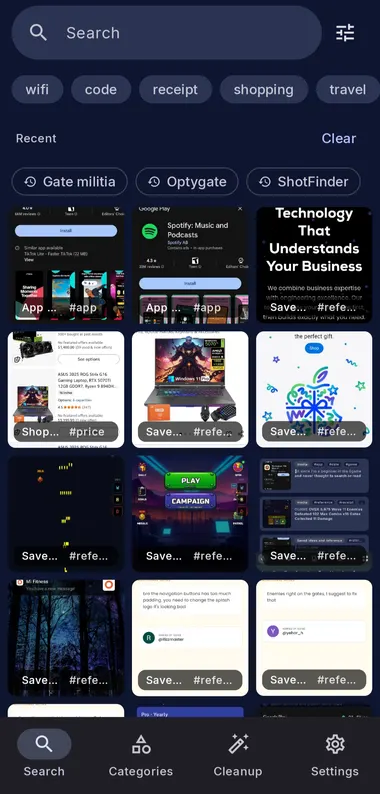
ShotFinder is a privacy-first Android app that searches your screenshots by the text inside them using on-device OCR, auto-sorts them into categories, and lets you act on what they contain. It does not take screenshots; it makes the ones you already have searchable and useful.
How to search your screenshots by text in 3 steps
Install and allow photos
Install ShotFinder from Google Play and grant access to your screenshots. No sign-in required.
It indexes on-device
ShotFinder reads every screenshot with on-device OCR in the background, so the text inside becomes searchable.
Search, then act
Type any word, code, price, or name, then tap a result or a smart action like copy code or open in Maps.
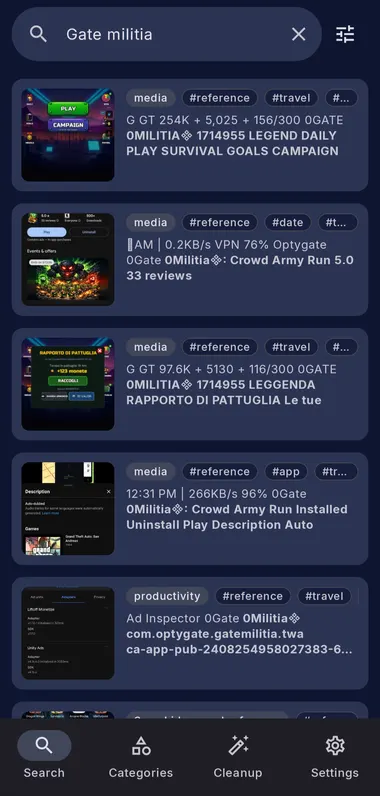
Search the text inside every screenshot
ShotFinder reads the text inside every screenshot with on-device OCR, so you can search by a word, phrase, code, price, brand, or address and find the right screenshot instantly. Search runs locally, works offline, and needs no account.
- Instant, as-you-type results across thousands of screenshots
- Finds shots from weeks or months ago, even long ones
- English plus 20+ Latin-script languages, on-device
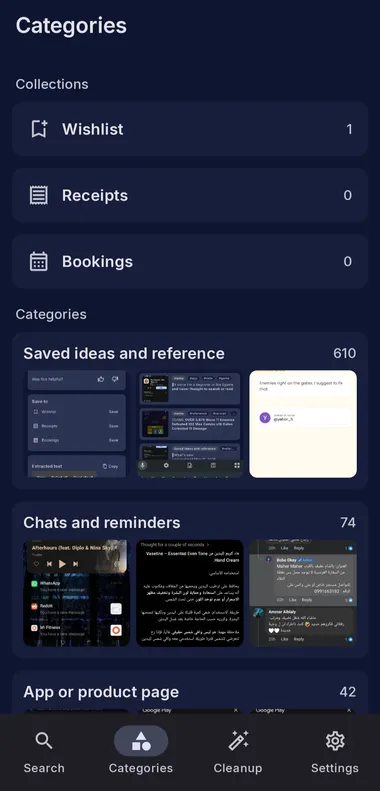
Auto-sorted into categories, zero filing
ShotFinder automatically tags and sorts every screenshot into categories such as receipts, codes, Wi-Fi, shopping, travel, chats, addresses, and app pages, so you browse by what matters instead of scrolling a chronological wall of thumbnails.
- Automatic tags and categories, no manual foldering
- Tap a tag to jump straight to similar screenshots
- Collections for the screenshots you want to keep handy
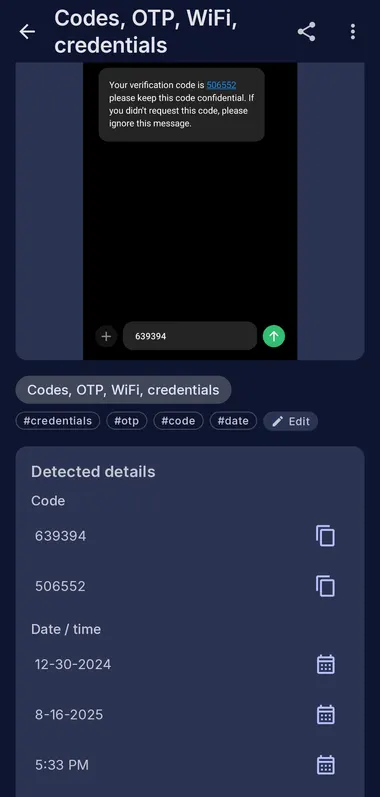
Do more than find them. Act on them.
ShotFinder reads what is inside a screenshot and turns it into a one-tap action, so you can copy a verification code, open a link, drop an address into Maps, or use Wi-Fi details without retyping anything. These smart actions run on-device and are free.
Copy an OTP or code
ShotFinder detects verification codes and copies them in one tap, no retyping.
Find a Wi-Fi password
Search wifi or the network name and use the detected Wi-Fi details instantly.
Open a link
Open a URL captured in a screenshot without copying it out by hand.
Open an address in Maps
Send a detected address straight to Google Maps for directions.
Find a receipt or order
Search a store, amount, or order number to pull up the right receipt.
Find a boarding pass
Pull up tickets, boarding passes, and booking screenshots when you travel.
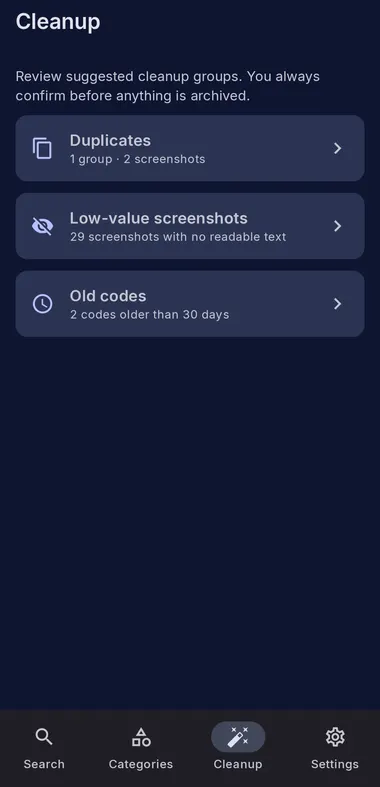
Clear duplicates and old codes, reclaim storage
ShotFinder Pro helps you review duplicate screenshots, shots with no readable text, and old verification codes. Archive them to tidy your library, or review and confirm deletion to reclaim storage. Archiving alone does not delete the original images.
- Duplicate detection grouped for quick review
- Low-value and old-code suggestions you approve
- You always confirm before anything is archived
Private by design, and we show you how
Search, OCR, tags, categories, smart actions, and cleanup all run on your device and work offline. ShotFinder uses no product analytics SDK, ever. Five named features can use the network, each one under your control, and your screenshots and the text in them leave your device only when you tap AI Enhance.
No product analytics SDK. No ad tracking. Ever. Read the full privacy policy.
ShotFinder vs a plain gallery or photo search
Gallery search and offline features vary by app and phone. ShotFinder brings text search, automatic categories, and smart actions together in a dedicated screenshot library.
| Capability | ShotFinder | Gallery apps |
|---|---|---|
| Dedicated on-device index of your screenshots | Included | Varies by app |
| Search by the text inside the image | Included | Varies by app |
| Auto categories (receipts, codes, Wi-Fi, travel) | Included | Varies by app |
| Smart actions: copy code, open link, Maps, Wi-Fi | Included | Varies by app |
| Duplicate and old-code cleanup | Pro | Varies by app |
| Works offline, no account | Included | Varies |
| No product analytics SDK | Included | Varies |
Built for Android 8.0 and newer
ShotFinder supports Android 8.0 and newer, with on-device OCR for English plus 20+ Latin-script languages including Spanish, French, German, Italian, and Portuguese. No specific phone brand and no specific assistant required.
Start free. Upgrade when you need more.
Search, organize, and act on your screenshots for free, with no account. Upgrade to Pro for cleanup tools, deeper customization, and AI Enhance.
Core search is free. No account needed.
- Search the text inside every screenshot
- Automatic tags and categories
- Smart actions: copy code, open link, Maps, Wi-Fi
- Basic cleanup
Everything in Free, plus the power tools.
- Cleanup wizard and duplicate detection
- Custom categories, rules, and advanced filters
- Batch actions
- AI Enhance for hard cases (handwriting, low quality, non-Latin)
Lifetime includes 500 AI Enhance credits. Top-ups from $9.99 per 1,000.
USD reference prices. Local prices and available offers appear in the app before purchase.
Frequently asked questions
How do I search my screenshots by the text inside them on Android?
Install a screenshot search app like ShotFinder, which runs on-device OCR on every screenshot so the words inside become searchable. Open ShotFinder, type any word, phrase, code, price, or name you remember, and it surfaces every matching screenshot instantly. Indexing runs in the background, search works offline, and no account is required.
Is there a free app to find screenshots by text?
Yes. ShotFinder is free to search every screenshot by the text inside it, with automatic tags, categories, and smart actions, and no account needed. Core search, auto-tagging, and basic cleanup run entirely on-device at no cost. Pro adds a cleanup wizard, duplicate detection, custom rules, advanced filters, batch actions, and AI Enhance.
Can I search the text inside a screenshot without uploading it to the cloud?
Yes. ShotFinder reads the text inside your screenshots with on-device OCR, so search runs locally and works offline with no sign-in. Screenshot images stay on your phone and leave only if you tap AI Enhance, the optional Pro feature for hard cases. ShotFinder uses no product analytics SDK.
How do I find a screenshot that has an OTP or verification code?
Search the code or the sender's name, or open ShotFinder's auto-generated codes category. ShotFinder detects verification codes inside screenshots and offers a one-tap copy smart action, so you can grab an OTP without retyping it. Old codes can be cleared in bulk using the Pro cleanup tools.
How do I find a Wi-Fi password I saved in a screenshot?
Open ShotFinder and search wifi or the network name, or browse the auto-sorted Wi-Fi category. ShotFinder detects Wi-Fi details inside screenshots so you can read or use them in one tap, instead of scrolling your gallery. This detection runs on-device and is included in the free version.
How do I organize thousands of screenshots automatically on Android?
Use an app that reads each screenshot with OCR and files it for you. ShotFinder automatically tags and sorts every screenshot into categories such as receipts, OTP codes, Wi-Fi, shopping, travel, chats, and addresses, with no manual foldering. For large libraries, Pro adds a cleanup wizard, duplicate detection, and custom categories and rules.
How is ShotFinder different from a general photo or gallery app's text search?
ShotFinder is purpose-built for screenshots. It keeps a dedicated on-device index of your screenshots, auto-sorts them into categories like receipts, codes, and travel, and adds smart actions such as copy-OTP and open-in-Maps in one screenshot-focused workflow. Search works offline with no account.
Is ShotFinder private, and does it work offline?
Yes. Search, OCR, auto-tagging, categories, smart actions, and basic cleanup all run on-device and work offline. ShotFinder uses no product analytics SDK. It has five named, user-controlled network features, customization sync is off by default, and screenshot images leave your phone only when you tap AI Enhance.
What is AI Enhance, and when do I need it?
AI Enhance is an optional, per-tap Pro feature that sends a single screenshot for a stronger recognition pass when on-device OCR struggles, such as handwriting, blurry images, or non-Latin scripts. It is the only time a screenshot's image and text leave your device, and only when you tap it. Lifetime includes 500 AI credits; top-ups are $9.99 per 1,000.
How much does ShotFinder Pro cost, and what does it unlock?
ShotFinder Pro is $1.99 per month, $12.99 per year, or a $19.99 one-time introductory Lifetime purchase. Pro unlocks the cleanup wizard, duplicate detection, custom categories and rules, advanced filters, batch actions, and AI Enhance. Search, auto-tags, auto-categories, and smart actions stay free with no account.
Find the screenshot you remember.
Start with a store name, booking number, street, or phrase. Our guide covers useful search queries, privacy checks, and what to try when text recognition misses a result.
Find any screenshot in seconds.
Free. No account needed. Works offline. Get ShotFinder on Google Play and turn your screenshots into something searchable, organized, and useful.